

Announcement : 

Term 4, 2026 is underway

Week 2 Term 2 Fun Learning Update

 It is the start of Week 2 Term 2 2020!

Last week I received some amazing photos and a few movie clips of learning happening at home. Thank you for getting in behind this challenge.  As you can see it was worth it!

There are some amazing ideas and you can clearly see there is lots of learning happening in all different shapes and forms.  You can see highlights from Zoom conferences with teachers and classmates, obstacle courses in and outside, building (basketball hoops, go-karts, bike ramps), creative thinking (photos with optical illusions that play on the eye, robots, beautiful art etc), PE lessons, Family time, cooking (and eating!), Maths in action, great story writing, handwriting, new time…..the list goes on!  This slideshow is now on our school Facebook page and I hope you enjoy it. It may also give you some ideas for this week.

As the week goes on we will add some of the movies sent in.

Keep sending your photos or movies in as we can do the same again at the end of this week.

Enjoy your day!

Miss O

LEARNING IS FUN CHALLENGE 2

Hi everyone!  I am Esther and I am the Head girl at Greytown School.  Here is my “Learning is Fun Challenge” for Week 2.

Can you build a tiny house?  You can use Lego, Wood, Cardboard, Paper, Cards…..be creative!  You could even design the inside or draw it (for a challenge make a scale drawing!)
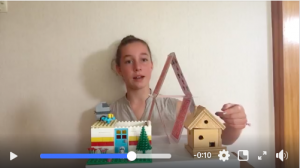
Check out the video on our school Facebook page!

Upload your photos in the comments below  the challenge on our Facebook page or you can send them to Esther wilest@demo.kiwischools.org  Include your school house name underneath if you want house points ie: Takitimu, Te Arawa, Tainui or Aotea
At the end, you will get points for your houses AND go in a S.H.A.R.P draw with prizes given out when school returns.
Looking forward to seeing your amazing creations and sharing them with others!
Esther W!


 

Day 3 Term 2 Fun Update

Day 3 has begun.

Wow, yesterday was full of responding to the most amazing emails about what you are all doing. Today I will put them all together into a presentation to celebrate our first week of remote learning. (Still, time to send them in this morning to principal@demo.kiwischools.org)

You will be able to see a wide range of learning from at home cooking classes, maths class with building fences, engineering and construction with robots and drift bikes, Zoom cooking classes with yummy donuts (or doughnuts) being made, Reading in funny yet comfy places, pets getting or helping with lessons, digital learning in all sorts of places…..the list goes on….INCREDIBLE JOB!!!

Today kids I would like you to take a moment to say a huge thank you to your parents. It is a lot of work and fun being a parent, especially in the lockdown. Please get them a big hive 5, hug, pat on the back…or something else like a card. Just to say how proud of them you are and we are.

Parents, adults and teenagers in the family helping out…we say a big THANK YOU on behalf of our school community for helping everyone to stay safe and to have fun with learning.

Yesterday I asked a question…had a wondering…about Mr Salter’s hat.. was it for the cold or was it covering a bad lockdown hairstyle? Kids in his class soon told me that no he was just cold and that his hairstyle was ok in his Zoom classes. Phew! Glad to hear Mr Salter.

Finally hope your paper plane (Carlo’s Weekly School Challenge on Facebook) making is going better than mine! Still working on it but enjoying the trials that have been hilarious.

Enjoy Day 3 and then take the next two days off.

Miss O

Day 2 Term 2

Hi everybody.

I know that a few people are not linked to our Greytown Facebook page so here is a fun update for Day 2.

Here we go Greytown School…Day 2!

Yesterday I received some great photos of children learning and teachers teaching. I won’t show you them just yet so people can still send theirs in…but I did see some incredible learning taking place.

These are only a few examples that you will see tomorrow.

  • Hugo Preston was learning how to add while baking…He added the smarties on the first two biscuits together to make the last biscuit have even more Smarties!
  • The Bliss family was learning about the correct angle, speed and height to make the perfect jump shot. They even added in a frog leap!
  • Orlagh was biking while listening to Harry Potter in her backyard.
  • Hugh was learning how to construct a fort so he could read, play and learn in it.
  • Claudia and Genevieve were learning about machinery, hydraulics, pressure etc while helping the family split logs outside.
  • Numerous families sent in photos of children Zooming with their teacher and class, learning in their Google Classrooms or with Seesaw. AWESOME!

I did have one question though about Mr Salter’s photo…Was he cold like he said he was?…or has he got a really bad lockdown hair cut that he is hiding? LOL…Room 14 and Mr Salter might be able to help us answer that question today.

Remember Carlo’s plane challenge Facebook post from yesterday….if you are like me I am having to do a lot of trial and errors. I could get a prize for the curliest flight and thankfully I have improved since my first attempt that landed less than a metre away. See how you go! Challenge the adults in your house to help.

So here we go for Day 2. We’ve got this! All we need to do is be S.H.A.R.P and give it a go.

Enjoy Miss O

PS: For those who haven’t sent a photo of them learning remotely yet…I look forward to seeing even more emails today of what you are up to for learning. Simply send them to principal@demo.kiwischools.org

Term 2 begins!

Hi everyone
 
I hope you all had a wonderful Easter and were all visited by the Easter Bunny. I heard that some of the hunts were very exciting and a few eggs were very tricky to find in a few houses!
 
As you know it is the start to Term 2 tomorrow.
 
Firstly a big welcome to our new students who are starting with us tomorrow. Your teachers and classmates will look forward to getting to know you online or by phone… until we can all get to know you and your families in person.
 
LEARNING
It will be a very different way of learning to what we are all used to, however, I am sure we will all do our very best and work together to make it happen in one form or another.
 
There is a lot of information happening in the media and on social media about learning. Do what is manageable for you and your kids, but don’t feel pressured to do it all ie: Join every free app available, watch TVNZ learning channels, do all the class learning ideas either digitally or on paper…..etc
 
Please remember at all times the biggest priority during this time is the happiness, well being and safety of you and your family. Children will be learning even in the day-to-day interactions and household activities that they are apart of.
 
After all, this when school is back together, we can go from wherever we are at and still do extremely well!
 
DIGITAL LEARNERS
Teachers have been doing the last catch up meetings today and digital learning is now ready to be sent out first thing tomorrow morning for kids to begin. Remember there may be a lot of ideas and activities, however, do what is achievable to you. If you need more ideas…let your teacher know lol!
 
It will be a learning curve for everyone and we will take each day as we go and make necessary adjustments to learning programmes together.
 
Digital kids will have work sent out to them via their Seesaw accounts or Google Classroom (Kids – login into your class tomorrow and also check your school Gmail too).
 
If you have not received anything or you have questions teachers are contactable from 9am to 3pm Monday to Friday via their email address. If you are unsure what their email is simply going to our website and look under contacts and staff lists.
 
PACKS AND OTHER DEVICES
I have sent the list of learning packs that I know of off to the Ministry. They have sent out some of the first ones however we still have a few families waiting on packs …all going to plan they will be with you in the next couple of days.
A few families are waiting for school devices. As previously emailed these will be arriving by the end of this week by courier.
 
PARENT CONTACTS
It has come to our attention through the last week that some parents may have changed their email address and/or contact details. If this is you or you want to double-check then please email your teacher.
 
HELP NEEDED
Besides the teachers, if you need any assistance from me please do not hesitate to email me principal@demo.kiwischools.org
 
FUN CHALLENGES
After all this admin…. there will be some fun challenges put on the school Facebook from our Head and Deputy Head Students or myself that your kids might like to get involved in with your help. These will be posted in the next few days.
 
So let’s get excited because school is about to begin!
 
thanks
Miss O!

Setting up a FREE Digital Safety Filter for home.

Tēnā koe
Helping students stay safer online from home
As you know, children’s online safety is important. At school, Network for Learning (N4L) helps keep your students safe from the bad side of the internet. During lockdown, the students’ place of learning shifts to their home. So N4L has worked out a way to help parents keep their children safely connected at home.
FREE N4L safety filter for all students
We’ve set up a safety filter that parents can set up on their child’s learning devices from home. Just go to switchonsafety.co.nz to find clear instructions on how to do this.The free N4L safety filter (by global cyber-security leader, Akamai) blocks websites containing known cyber threats like phishing scams, malicious content and viruses, while also protecting children from content deemed the worst of the web (like adult sites).It is an extension of one of the many safety and security services we have in place at schools and is a valuable layer of protection to help keep children safe online. Please remember that technology is not a silver bullet and the filter should be used in combination with Netsafe’s online parent safety toolkit.
How does it work?
Once a child’s device is set up, all internet search requests will go through the safety filter which checks if the website they are trying to visit is safe before allowing access. If it’s a website that’s known to be unsafe, then it will be blocked. The safety filter is applied to the child’s device, so parents’ devices are not affected. 

Any questions?
We have answered key questions at switchonsafety.co.nz/faqs alternatively please send any questions to help@n4l.co.nz.

Switch_on_Safety_A5_2020

School Closure information and Remote Learning Update

Dear Parents and Caregivers

Please read the following information (link below) carefully.

We want to reinforce the key essential points

  • The school will only be open tomorrow for essential workers children only ie;  Children of supermarket workers and emergency services (doctors, nurses etc) who need additional time to find care.
  • School is closed tomorrow until further notice for all our other children.  They are now to stay at home.
  • On Wednesday 25th March school will be closed for everyone until further notice.
Coronavirus update Wednesday 23rd March 2020

All the very best.  Keep safe and positive.

Patrice O’Connor.

Coronavirus or COVID-19 Current School Update

Hi Parents and Caregivers

Attached is the latest information that our school has in regards to the recent COVID-19 pandemic. This was sent home today in paper copy with all our eldest children in each family.  We will continue to update you as we know more information.  Please take time to read this update thoroughly. This update may also require your family to return an information slip or update our current emergency details for your family.  Please check your child’s bags.

Thanks

Patrice O’Connor

Principal of Greytown School.

Coronavirus update Wednesday 18th March 2020